Tutorial contents · Applies to: 0.1.65
Visual guide: the route through this chapter
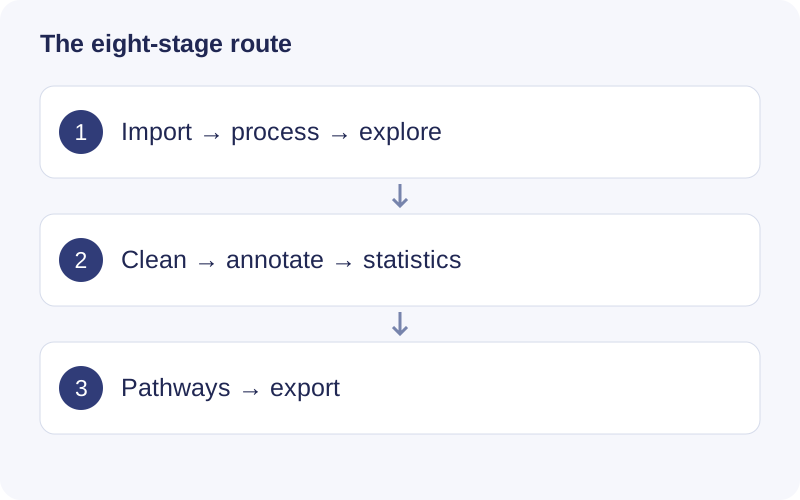
At each stage, open the settings and confirm the selected input. Run once, wait for completion, and inspect warnings plus the displayed dataset summary. Continue only after the sample/feature counts and plots make sense. Saving parameter drafts does not recompute the displayed result.
1. Data import
Choose mzML/mzXML files and sample information, review the groups and click Import raw files. Import registers files; it does not detect chromatographic peaks. Folder grouping is a convenience, so check it against the biological design.
2. Raw data processing
Configure peak detection, RT correction and feature grouping. The software calls massprocesser/XCMS-related functions. Review m/z tolerance against instrument accuracy and the peak-width interval against observed chromatography. Signal/noise, noise and prefilter settings control low-quality signals; grouping bandwidth and minimum fraction control feature correspondence across samples.
Fill peaks integrates missing chromatographic signals where supported. It differs from later matrix imputation. Set Worker processes to match available memory as well as CPU capacity. In macOS 0.1.65, inspect representative samples with Parameter trial, then click Process raw data for the complete imported set.
Inspect the resulting feature table and mass_dataset. Project folder opens the saved outputs; use the run ID to find the correct execution.
3. Data exploration
Review m/z–RT distributions, sample and feature missingness, batches, peak shapes, spectra and intensities. Select a feature to inspect its evidence. Feature filters change the displayed subset. Manual Exclude is a review label; it does not remove rows from the downstream matrix.
4. Data cleaning
Choose missingness filtering, investigate potential outlier samples, impute remaining missing values, normalize, and apply batch integration only when appropriate. QC-based filtering and correction require suitable quantitative QCs. A PCA outlier alone does not justify exclusion.
Check the dataset size and metrics before and after each operation. Separately fitted before/after PCAs do not share a fixed coordinate system. Retain the unmodified input and document exclusion decisions.
5. Metabolite annotation
Choose a metid-compatible database, polarity, chromatography, adducts and matching tolerances. Use RT matching only when reference and experimental conditions are compatible. Select candidates to inspect experimental/reference MS2 mirrors, mass error and supporting evidence. An MS1-only match is a candidate, not MS2-supported identification.
Where available, Skip annotation for statistics lets you continue feature-level analysis. Annotation-dependent pathway analysis requires suitable annotations and updated downstream steps.
6. Statistical analysis
Inspect PCA and explicitly choose the comparison groups. Check which input dataset and intensity transformation are used. Paired analysis requires a correct subject column and one matching observation in each group per included subject; sample order cannot establish pairing. Record the test, fold-change direction and multiple-testing correction.
7. Pathway analysis
Check compound IDs, candidate ambiguity, input selection, organism, pathway database and background definition. Do not count multiple ion features as independent confirmations of one compound. Empty results can be valid: investigate coverage and mappings before changing thresholds.
8. Results & export
Export complete tables, objects, parameters, code, logs and session information for the desired run scope. A paginated preview is not the complete table. Keep external raw files and databases with the project backup.
Continue or rerun
Reopen a saved project to continue at the first unfinished step whose prerequisites are satisfied. A successful upstream rerun makes dependent downstream results stale; rerun the affected steps. Old results remain in Run history. A failed or canceled retry does not replace the previous successful result.
Recovery operates between saved steps, not at an arbitrary scan inside interrupted peak detection.
Walkthrough: Read a saved workflow result
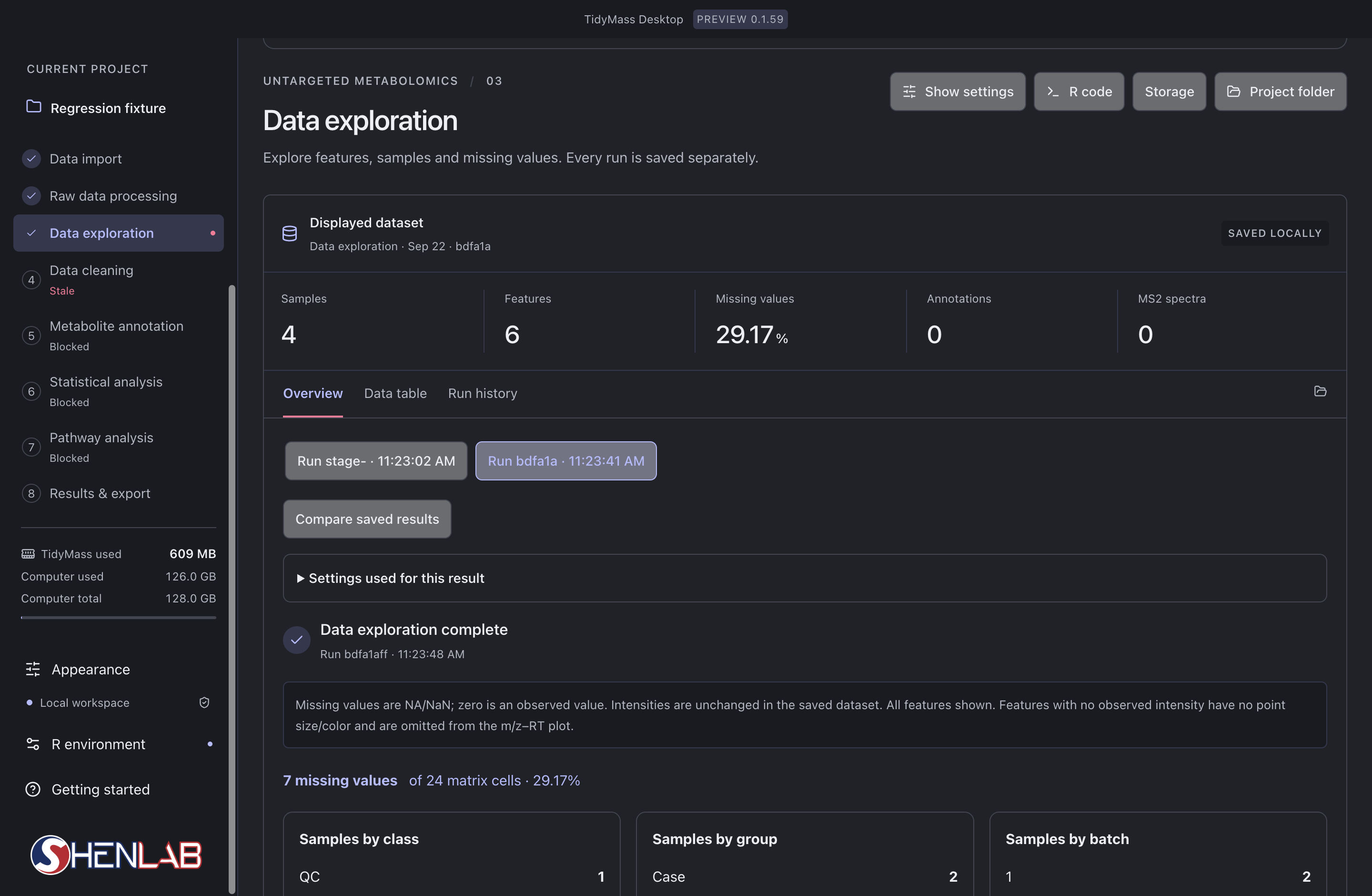
- Read the left-hand stage list first. The selected stage is Data exploration; Data cleaning is marked Stale because its upstream input changed. Blocked stages still lack an eligible input.
- In Displayed dataset, check the run identifier, Samples, Features and Missing values. Here 7 of 24 cells are missing, giving 29.17%; this is a matrix-cell percentage, not the percentage of completely missing samples.
- Select a saved run and expand Settings used for this result. Compare saved results only after checking that their input and parameters answer the same question.
- After checking the result, rerun stale dependent stages in order. If a stage fails, inspect its first error before changing parameters or repeating the task.